Server – Migrate agent to new server with Ivanti EPM
Server Migrate agent – Step-by-step guide to Server – Migrate agent to new server with Ivanti EPM, including configuration, deployment, troubleshooting and practical administration
Useful external reference: Ivanti resources.
Server Migrate agent –
Step 1 – Backup Keys Folder from Old Server
Server Migrate agent – Old Core Server
Useful external reference: Ivanti resources.
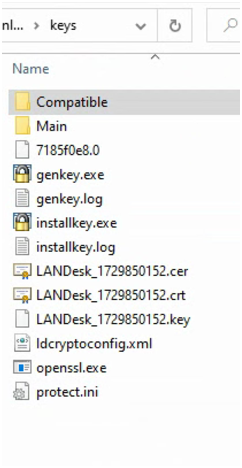
Server Migrate agent – Copy the folder C:Program FilesLANDeskShared FilesKeys to a temporary folder on the new server.
Useful external reference: Ivanti resources.
Step 2 – Copy Certificates to the New Server
Server Migrate agent – New Core Server
Useful external reference: Ivanti resources.
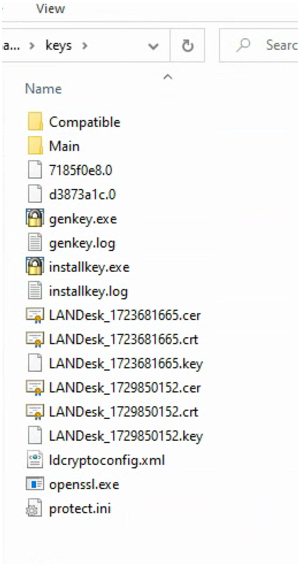
Server Migrate agent – Copy the following files from the old server to the new server:
Useful external reference: Ivanti resources.
- C:Program FilesLANDeskShared FilesKeys*.key
- C:Program FilesLANDeskShared FilesKeys*.cer
- C:Program FilesLANDeskShared FilesKeys*.crt
- C:Program FilesLANDeskShared FilesKeys*.0
- C:Program FilesLANDeskShared FilesKeysldcryptoconfig.xml
- C:Program FilesLANDeskShared FilesKeysCompatible*.xml (if client security mode is enabled)
Step 3 – Install the Certificate
Server Migrate agent – New Core Server
Useful external reference: Ivanti resources.
- Double-click the .crt file located in the Shared FilesKeys directory.
- Click on Install Certificate.
- Select Local Machine as the store location and click Next.
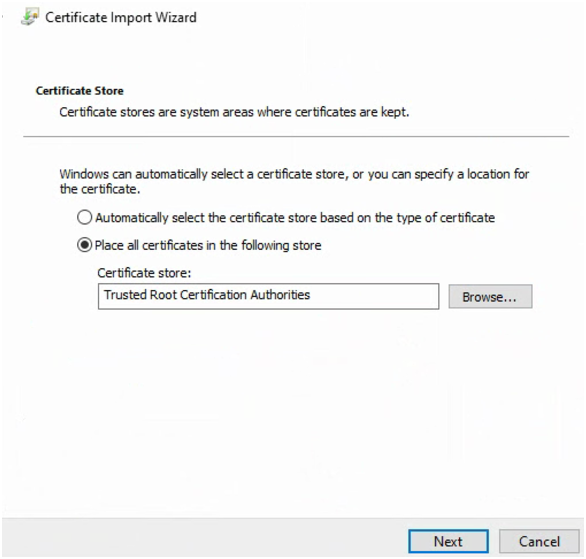
- Choose the option Place all certificates in the following store and select Trusted Root Certification Authorities.
- Click Next to complete the installation.
Step 4 – Update DNS Records
Server Migrate agent – Stop the old Core Server. On the DNS server, update the A record of the old Core Server to point to the new Core Server. Clients will appear on the new Core Server within 24 hours after their inventory updates.
Useful external reference: Ivanti resources.
Step 5 – Deploy the New Agent
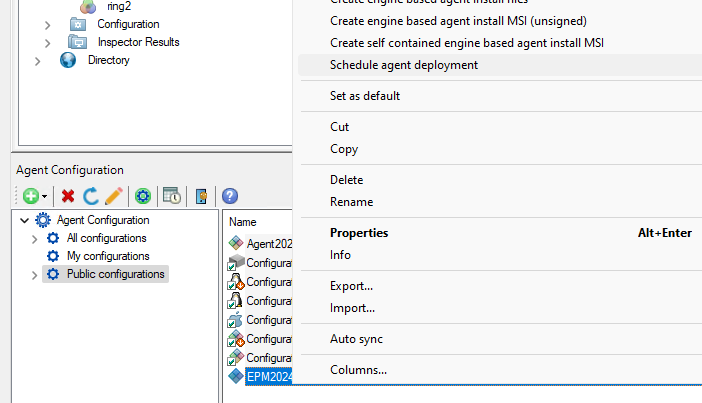
Server Migrate agent – In Agent Configuration, select the agent and schedule its deployment. Add the old agent to the scheduled task and start the deployment.
Useful external reference: Ivanti resources.