
Displaying Organizational Units with MDT
Displaying Organizational Units – During the deployment of a workstation, it’s possible to showcase the list of Organizational Units (OUs) where the computers will be integrated into the
Useful external reference: Microsoft Learn.
Displaying Organizational Units – During the deployment of a workstation, it’s possible to showcase the list of Organizational Units (OUs) where the computers will be integrated into the domain.
Useful external reference: Microsoft Learn.
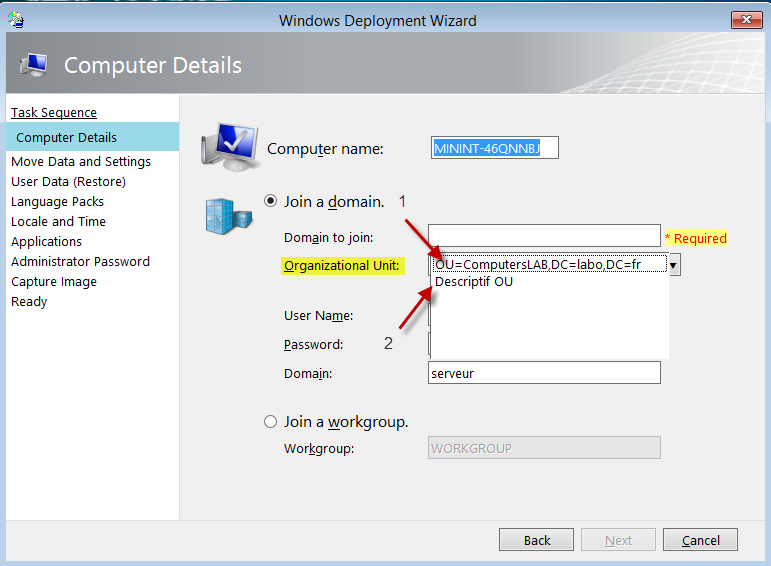
Displaying Organizational Units – You can display a description (2) or the complete LDAP query (1)
Useful external reference: Microsoft Learn.
Displaying Organizational Units –
Useful external reference: Microsoft Learn.
Displaying Organizational Units – You need to create the ‘DomainOUList.xml’ file and place it in the ‘Control’ directory of the deployment share
Useful external reference: Microsoft Learn.
Displaying Organizational Units – Just like on the previous screen, you can display:
Useful external reference: Microsoft Learn.
- A description of the OU (2)
<DomainOU value="OU=ComputersLAB,DC=labo,DC=fr" > Descriptif OU </DomainOU>
- The complete LDAP query (1)
<DomainOU>OU=ComputersLAB,DC=labo,DC=fr</DomainOU>
Displaying Organizational Units – Example
Useful external reference: Microsoft Learn.
<DomainOUs>
<DomainOU>OU=ComputersLAB,DC=labo,DC=fr</DomainOU>
<DomainOU value="OU=ComputersLAB,DC=labo,DC=fr" > Descriptif OU </DomainOU>
</DomainOUs>
Displaying Organizational Units –
Useful external reference: Microsoft Learn.